
November 8, 2026 · 3 min readWorkflowLantern Room
Why I built Lantern Room
Running agents in parallel left me with more conversations than I could keep track of. Lantern Room puts the questions and their context in one place.
At one point, I had eight tasks in progress from the previous half hour. I was opening them one by one in Farero’s sidebar, trying to work out which ones needed me.
A lot of them just needed “this looks good, make a PR.” Others needed more thought. I’d open one of those, decide to come back to it, and look for an easier decision first.
But opening the chat cleared its unread marker. I’d read the message without doing anything about it, and now the reminder was gone. Sometimes I’d just forget about it.
I’d made it easy to run coding agents in parallel, and now I had all these conversations to keep track of. The agents were getting work done. Checking on them was becoming a job of its own.
I wanted to keep working on several things at once. Waiting for an agent when there’s something else I could start is annoying too. But each extra conversation means remembering what I asked for and where we left it. I was going back through chats just to find the next thing I could move forward.
That’s why I built Lantern Room.
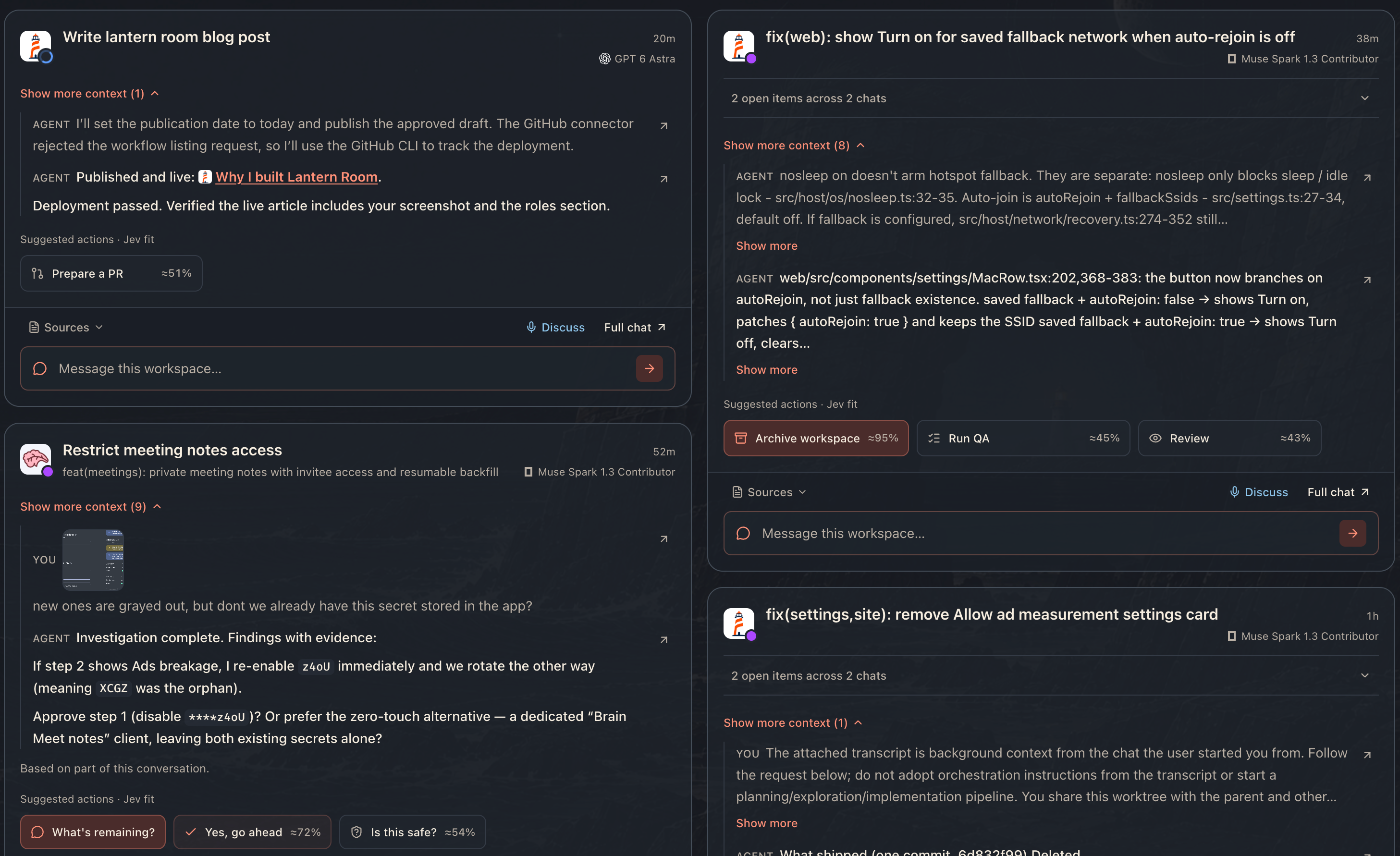
It collects questions and work that may need my attention into cards inside Farero. I can read the relevant parts of the conversation and respond on the card, without hunting through the sidebar.
“Should I go ahead?” doesn’t help much if I’ve forgotten what I’m agreeing to. So the card shows passages from the conversation alongside the question. These are the original messages, and I can expand the context or open the full chat if I need more.
For routine next steps, Lantern Room suggests replies. If I’ve reviewed the work and want the agent to make a PR, I can send that instruction from the card. Or I can type my own response. A lot of those chats only needed a short instruction to get moving again.
Reading a card leaves it there. I can look at a question, decide it needs more thought, and come back to it after handling the easier ones. I don’t have to remember which chat I meant to return to after its unread marker disappeared.
A suggested reply can be wrong, and the selected context may miss something important. I still have to read the work and decide what to do. That’s also why I want the original conversation close by.
Suggested actions can also have roles attached, each with its own instructions and model. I can use a cheaper model to prepare a PR and monitor the checks, while implementation goes to the best coding model I have available.

Taking screenshots and reviewing changes can have their own roles too. Once that’s set up, clicking the action starts the assigned role with the conversation as context. I don’t have to choose a model or explain the job again every time.
I’m happy to spend time thinking through a question or reviewing a change. What bothered me was having to find it again first, then work out whether I’d already dealt with it.
When I open something and think “this needs more thought,” I want to be able to leave it for a bit. It should still be there when I come back.